# How to use Swap

ANODEX: [<mark style="color:blue;">https://swap.anodos.finance/</mark>](https://swap.anodos.finance/)

Guide on X: [<mark style="color:blue;">https://twitter.com/AnodosFinance/status/1778376545712603599</mark>](https://twitter.com/AnodosFinance/status/1778376545712603599)

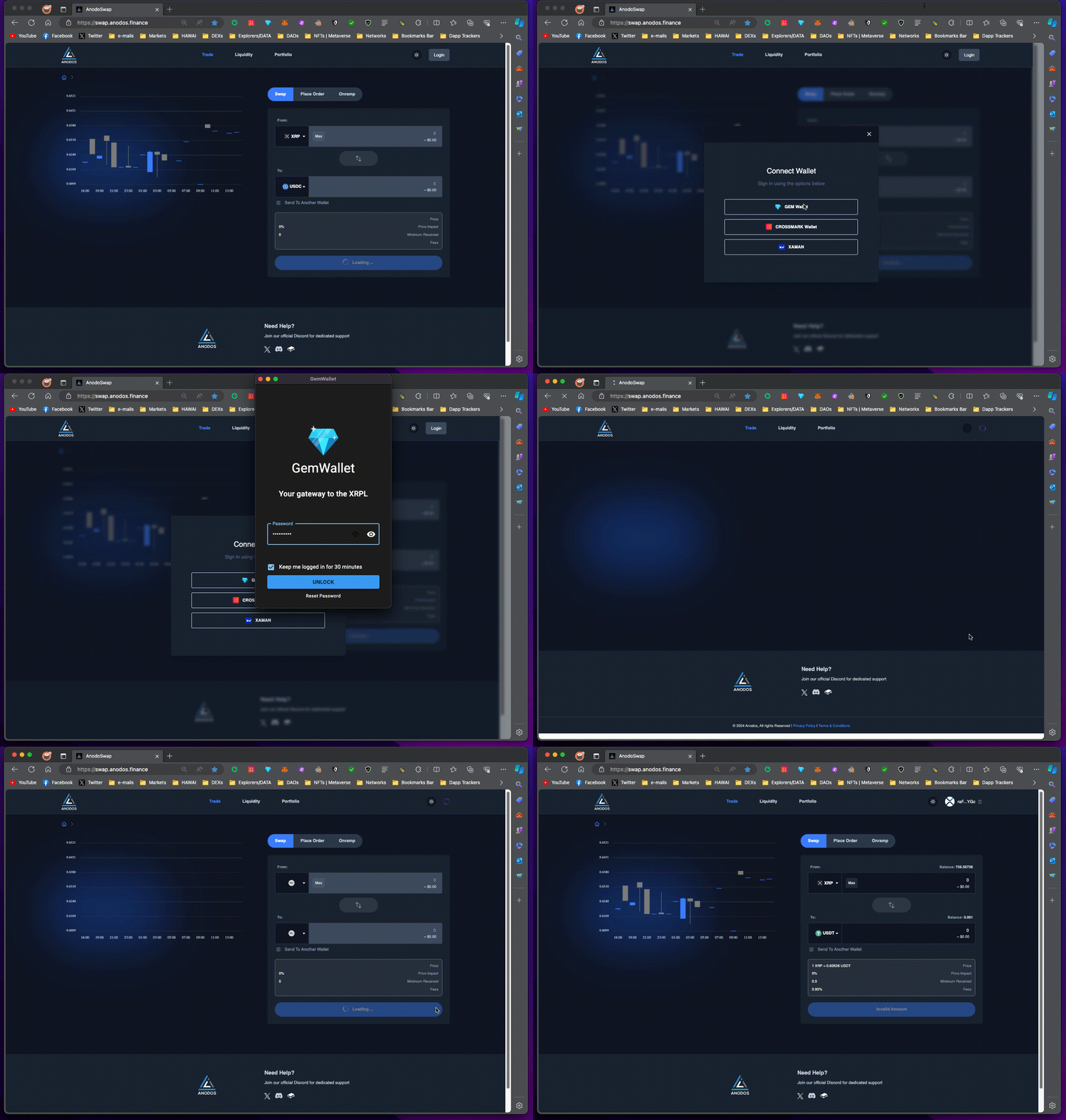
1. Go to [<mark style="color:blue;">https://swap.anodos.finance/</mark>](https://swap.anodos.finance/) , click "**Login**", choose the wallet you have, and approve the transaction that will come out on your wallet. You are now logged in.

<figure><img src="https://2773531205-files.gitbook.io/~/files/v0/b/gitbook-x-prod.appspot.com/o/spaces%2FwPYQpCxrPJoaRvqUIVza%2Fuploads%2FbkJCCtEHM4dILOM6ducC%2Flogin.gif?alt=media&#x26;token=e29c6fdb-f00b-479f-9ad5-16ea8f1abc23" alt=""><figcaption></figcaption></figure>

2. You can click on any of the two tokens and search for the token you want by name or by issuer address. If you haven't added the **trustline**, click on it so you can add it in order to be able to swap and hold the token in your XRPL account.

<figure><img src="https://2773531205-files.gitbook.io/~/files/v0/b/gitbook-x-prod.appspot.com/o/spaces%2FwPYQpCxrPJoaRvqUIVza%2Fuploads%2FY2AbmWAd82b2aFHsXGWM%2Fadd%20tl.gif?alt=media&#x26;token=bd484ea7-6db6-4841-a488-7c72a41b16e7" alt=""><figcaption></figcaption></figure>

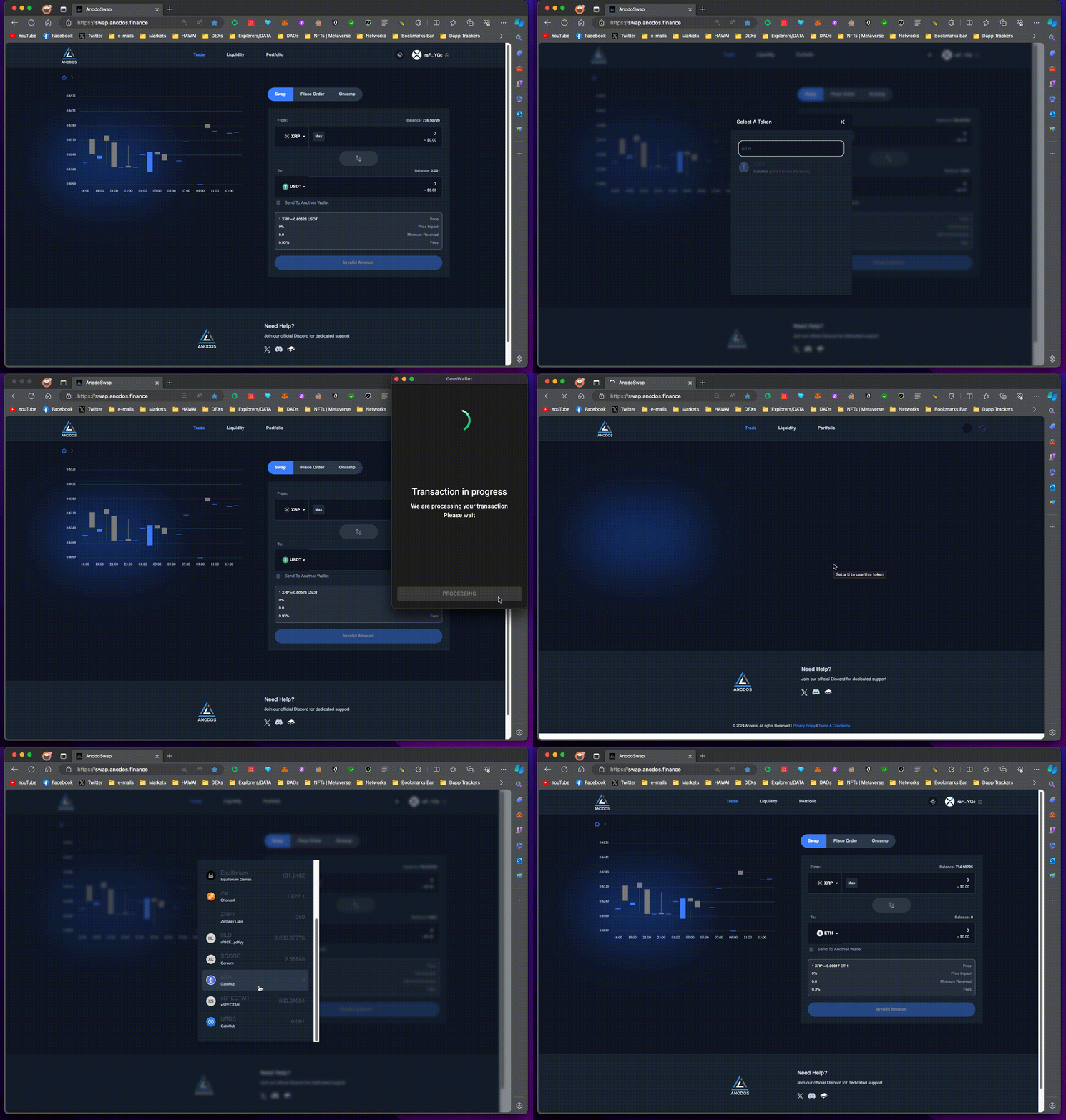
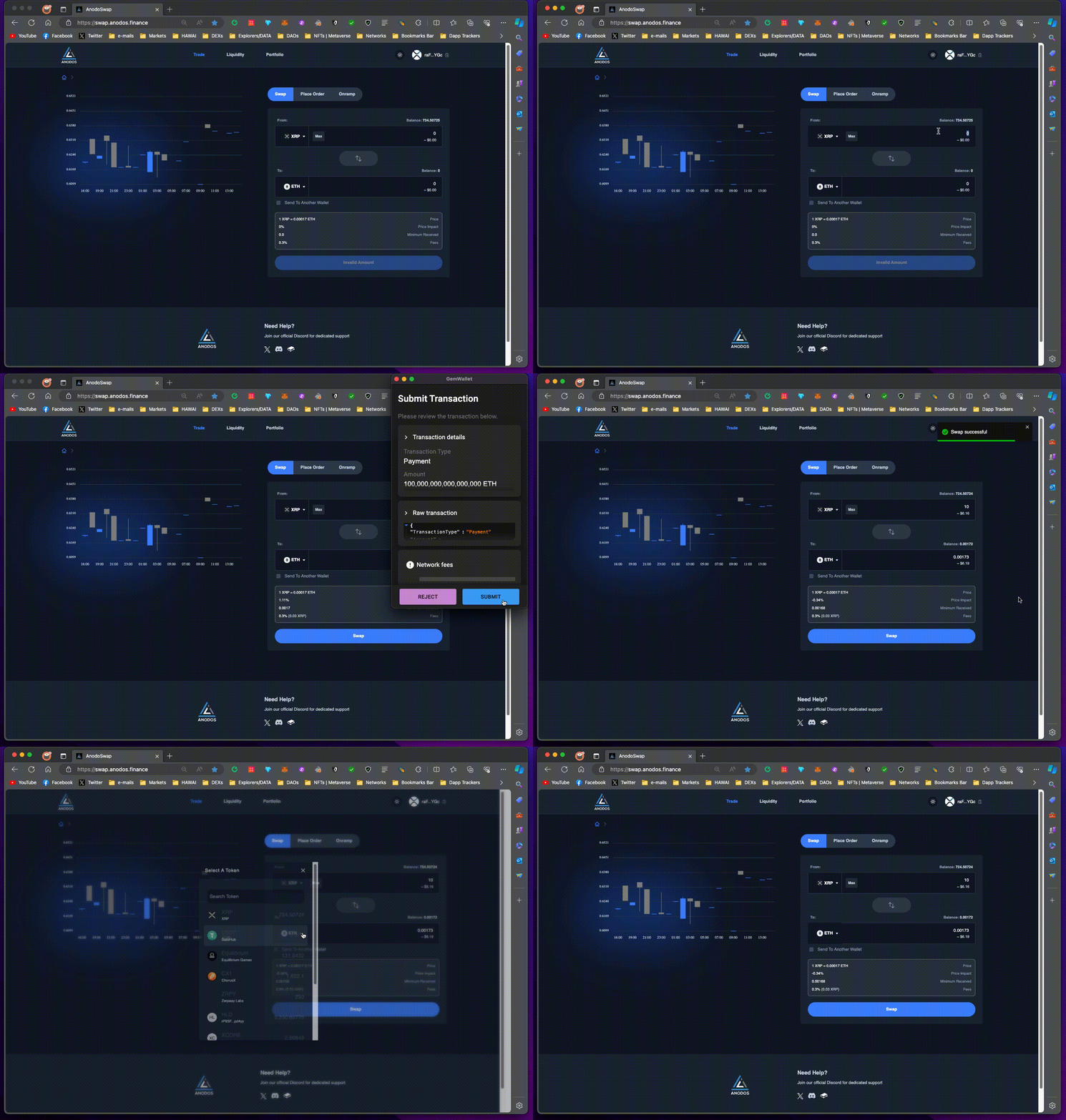
3. In order to **swap and trade assets**, select the tokens you want, type in the amounts, confirm the rate, price impact, minimum received, then click "Swap" and confirm with your wallet. You have now exchanged value.

<figure><img src="https://2773531205-files.gitbook.io/~/files/v0/b/gitbook-x-prod.appspot.com/o/spaces%2FwPYQpCxrPJoaRvqUIVza%2Fuploads%2FGLPaaxIhIRbFjvDpQji7%2Fswap.gif?alt=media&#x26;token=59ac620c-8c7d-43d3-99bb-d295562de46d" alt=""><figcaption></figcaption></figure>

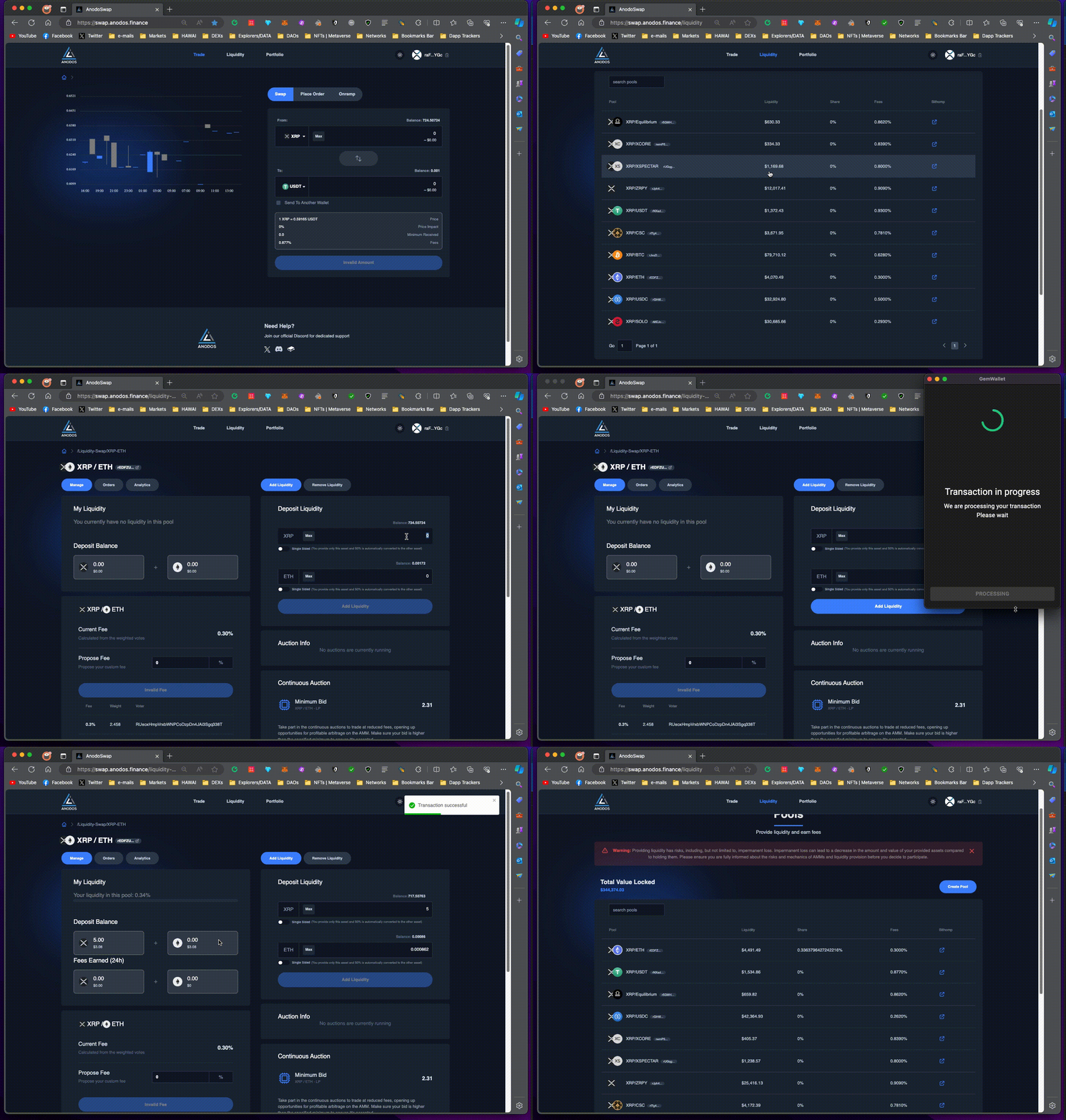
4. In order to **add liquidity**, go to "Liquidity" page, select the pool you want, type the amounts of tokens you want to provide, click "Add Liquidity", and confirm with your wallet. You are now a liquidity provider.

<figure><img src="https://2773531205-files.gitbook.io/~/files/v0/b/gitbook-x-prod.appspot.com/o/spaces%2FwPYQpCxrPJoaRvqUIVza%2Fuploads%2FTxnq07jTxMyIFsYQ6C3V%2Fadd-liq.gif?alt=media&#x26;token=7e4d6e63-ee54-41db-84ff-dea139869435" alt=""><figcaption></figcaption></figure>

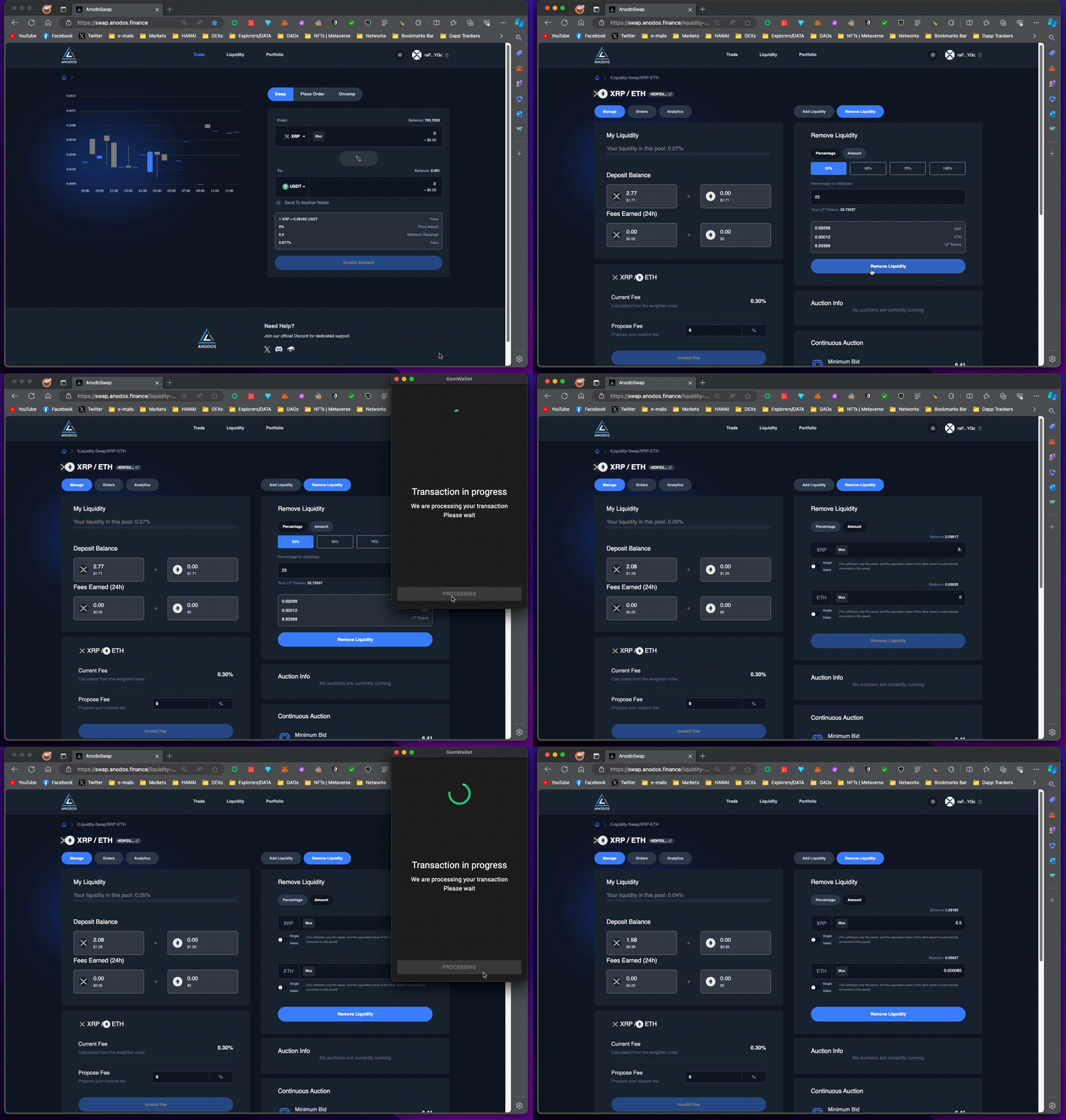
5. If you want to **remove liquidity**, you go to the pool page, click "Remove Liquidity" and then you can select either a percentage or specific amounts to withdraw. After that, you click "Remove Liquidity" down below and confirm with your wallet.

<figure><img src="https://2773531205-files.gitbook.io/~/files/v0/b/gitbook-x-prod.appspot.com/o/spaces%2FwPYQpCxrPJoaRvqUIVza%2Fuploads%2Fx3P3ABmt6ky0GOFJm0Ra%2Fremove-liq.gif?alt=media&#x26;token=ebcc1f13-c3aa-4493-8e55-d0e8abc14346" alt=""><figcaption></figcaption></figure>

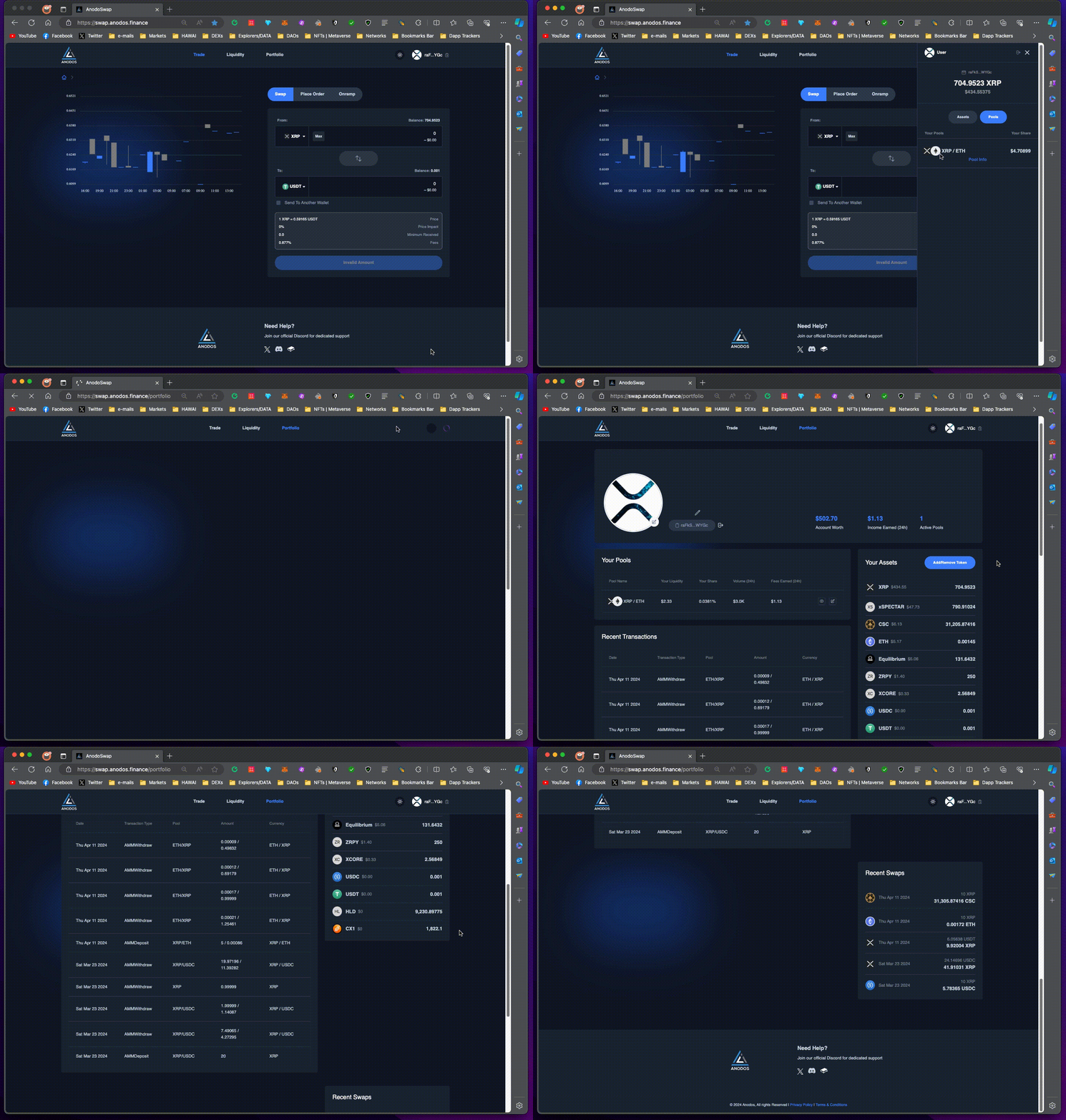
6. On your top right you can click to open the **sidebar menu** and see your balances and pools, and click on your profile image to go to the Portfolio dashboard.\
   \
   On "**Portfolio**" you can see details about your XRPL account and manage your assets and pools.

<figure><img src="https://2773531205-files.gitbook.io/~/files/v0/b/gitbook-x-prod.appspot.com/o/spaces%2FwPYQpCxrPJoaRvqUIVza%2Fuploads%2FLjzm84kq4qm3vyqZcdd9%2Fportfolio.gif?alt=media&#x26;token=33418c30-ac75-4221-9d87-ed14c7f86a67" alt=""><figcaption></figcaption></figure>

If you have any questions and want dedicated support, join our Discord: [<mark style="color:blue;">https://dsc.gg/anodos</mark>](https://dsc.gg/anodos)